What Happens to a Smart Lock When the Battery Dies? Backup Access Explained
 Blogs
Blogs
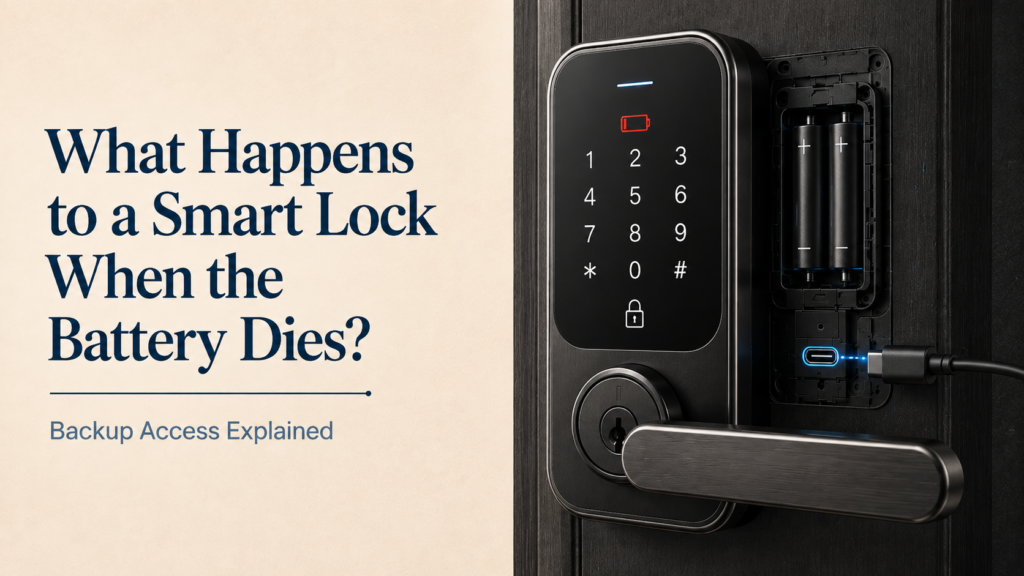
What happens when a smart door lock battery dies? You might worry about being locked out, but most smart locks are designed with emergency access options. Depending on the model, you may be able to use a physical key, 9V battery, or USB power bank to unlock the door.
But what if the battery dies completely? This guide explains how long smart lock batteries last, the warning signs to watch for, and how to unlock a smart door lock when the battery dies, so you can avoid an unexpected lockout.
1. How Long Do Smart Lock Batteries Actually Last
Before diving into emergency procedures, it helps to understand the lifespan of your lock’s power source. On average, a standard household smart lock runs on four alkaline AA batteries or a rechargeable lithium-ion pack. Under normal daily usage conditions, roughly 10 to 15 operations per day, these batteries will last anywhere from 9 to 12 months.
Models that connect directly to your home network via built-in Wi-Fi tend to consume power slightly faster than units that communicate using energy-efficient Bluetooth or Zigbee protocols through a dedicated smart bridge.
2. The Warning Phase: Signs Your Smart Lock Battery Is Dying
A smart lock will never simply stop working without warning. Manufacturers build multiple layers of alerts into the software to give you weeks of advance notice before the cells drain completely.
- Smartphone app alerts: when total capacity drops below 20 percent, your connected app sends persistent push notifications prompting you to change the cells.
- Visual LED warnings: the physical lock face will often flash a red warning light or display a low-battery icon every time you lock or unlock the door.
- Acoustic audio beeps: many models emit a unique series of persistent beeps or a spoken voice alert, such as Battery low, please replace, during operation.
If you ignore these warnings for weeks, the battery will eventually hit zero percent, and the internal motorized deadbolt will remain in its last locked state.
A dead smart lock battery is not an emergency if you know where to look. A hidden key cylinder, a 9V battery, or a power bank can get you back inside within minutes.
3. How to Open a Smart Door Lock When the Battery Dies
If you find yourself standing outside with a completely dead lock and no response from the keypad, you can use several smart lock battery backup options to gain entry safely.
Almost every high-quality electronic lock features a hidden, traditional keyway cylinder concealed behind a magnetic faceplate or at the bottom of the handle assembly. This mechanical keyway operates independently of any electronic components. Inserting your physical emergency override key and twisting it manually retracts the deadbolt, letting you inside instantly regardless of internal power levels.
2. The 9V Battery Jump-Start
What if you left your physical emergency key inside the house? This is where the external smart lock battery backup jump-start feature saves the day. Look closely at the bottom edge or faceplate of the outdoor lock assembly and you will find two small, exposed metal contact pins designed to connect with a standard 9-volt rectangular battery, which you can easily buy at any nearby convenience store or petrol station. Press the two terminals of the 9V battery firmly against these contact points and hold it in place. This sends a temporary surge of electrical current to the internal motherboard, lighting up the keypad or activating the biometric scanner. While holding the battery in place, enter your PIN code or scan your fingerprint to unlock the door, then slide off the interior cover to replace the dead AA batteries once inside.
3. Powering Up via USB-C Emergency Ports
Many modern, next-generation smart locks are replacing the older 9V metal contact pins with a standardized USB-C or Micro-USB emergency power port located at the bottom of the handle. If your lock has this port, simply plug a standard portable power bank, the same type you use to charge your mobile phone, into the lock using a regular charging cable. The power bank temporarily lights up the lock’s system, letting you use your regular smartphone app, fingerprint, or passcode to enter your home.
4. Practical Maintenance Tips to Prevent Smart Lock Lockouts
- Always use premium alkaline cells: never mix old and new batteries, and avoid cheap heavy-duty carbon-zinc batteries. Opt for premium, long-lasting alkaline brands that resist leaking.
- Stash an emergency key outside: keep a physical override key inside your car’s glove compartment, at your office desk, or safely with a trusted neighbour.
- Inspect the door alignment: if your front door is warped or misaligned, the motorized deadbolt will rub against the strike plate every time it turns, straining the motor and draining your power supply twice as fast as normal.

5. Frequently Asked Questions
Q: How long do smart lock batteries last?
Under normal daily use of about 10 to 15 operations per day, standard AA or lithium-ion battery packs typically last 9 to 12 months, though Wi-Fi models drain faster than Bluetooth or Zigbee models.
Q: What happens when a smart lock’s battery dies completely?
The internal motorized deadbolt stays in its last locked or unlocked state. You are not permanently locked out, since most locks include a physical key override, a 9V jump-start option, or a USB-C emergency port.
Q: What happens when a smart lock’s battery dies completely?
The internal motorized deadbolt stays in its last locked or unlocked state. You are not permanently locked out, since most locks include a physical key override, a 9V jump-start option, or a USB-C emergency port.
Q: Can I unlock a smart door lock with a 9V battery?
Yes. Most smart locks have two exposed contact pins on the outdoor faceplate that accept a 9V battery, which sends a temporary power surge to activate the keypad or fingerprint scanner.
Q: Do all smart locks have a physical key override?
Almost all high-quality electronic locks include a hidden mechanical keyway behind a magnetic faceplate or at the bottom of the handle, independent of the electronic components.
Q: How can I prevent getting locked out due to a dead smart lock battery?
Use premium alkaline batteries, keep a spare physical key outside the home, and check that your door is properly aligned so the deadbolt is not straining the motor.
6. Conclusion
By understanding your lock’s built-in emergency access features, from the physical override key to a 9V jump-start or a USB-C power bank port, you can enjoy all the convenience of modern, keyless living with complete peace of mind.