Soundbar Channel Configurations Explained: 2.1 vs 3.1 vs 5.1
 Blogs
Blogs
Shopping for a soundbar quickly introduces you to a confusing string of numbers separated by a dot, like 2.1, 3.1 or 5.1. Understanding the 2.1 vs 3.1 soundbar difference, and where 5.1 fits in, can help you avoid choosing a setup that does not match your viewing habits.
Understanding this notation removes the guesswork from your purchase. Here is what each number actually represents, and how to decide between a 2.1 vs 5.1 soundbar or a 3.1 configuration for your home.
1. Decoding the Numbers: What Channel Configuration Means
The first number in the sequence represents the count of standard speaker channels, like left, right and centre. The number after the dot always refers to the subwoofer, which handles low-frequency bass. A third number, when present, indicates dedicated height or upward-firing channels for formats like Dolby Atmos.
2. 2.1 Channel Soundbars: The Entry Point
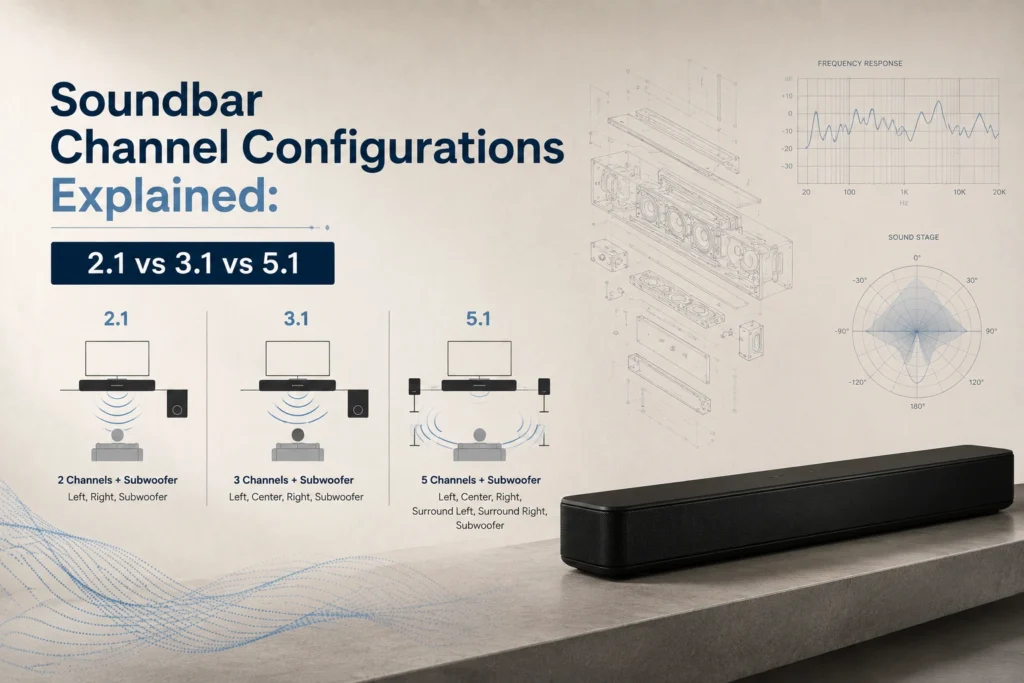
A 2.1 channel soundbar includes left and right stereo speakers plus a dedicated subwoofer. This setup significantly improves on a television’s built-in speakers, delivering clearer dialogue and noticeably better bass, making it a great entry point for casual viewers and small rooms who mainly want an upgrade over flat TV audio without a complex setup.
3. 3.1 Channel Soundbars: Adding Dialogue Clarity
A 3.1 channel soundbar adds a dedicated centre channel to the standard left and right speakers, plus the subwoofer. This centre channel is specifically tuned to reproduce dialogue and vocals clearly, which is why 3.1 systems are particularly popular among viewers who frequently complain about muffled or hard-to-understand speech in movies and shows.
The dot in a soundbar’s channel count is not decoration. It is the subwoofer, and the number before it tells you exactly how much directional sound you are actually buying.
4. 5.1 Channel Soundbars: True Surround Sound
A 5.1 channel soundbar setup includes front left, front right, a centre channel, two rear surround speakers, and a subwoofer. This is the configuration most people mean when they picture true cinema-style surround sound, since audio can be placed distinctly behind you, beside you, and in front of you, creating genuine directional immersion for movies, especially in medium to large rooms.
5. Which Configuration Should You Choose
- Choose 2.1 if you want a simple upgrade over TV speakers for casual viewing, news, or background music in a small space.
- Choose 3.1 if dialogue clarity is your main frustration and you do not need full surround immersion, especially when comparing a 2.1 vs 3.1 soundbar for a small or medium room..
- Choose 5.1 if you regularly watch movies or shows and want genuine directional surround sound, particularly in medium to large rooms where a 2.1 vs 5.1 soundbar comparison clearly favours the fuller setup.
- Consider Dolby Atmos variants of any configuration if height-based audio effects genuinely matter for your movie-watching habits.
6. Frequently Asked Questions
Q: What does 2.1 mean on a soundbar?
It means two standard speaker channels, left and right, plus one subwoofer channel for bass.
Q: What is the difference between a 3.1 and 5.1 soundbar?
A 3.1 system adds a dedicated centre channel for clearer dialogue, while a 5.1 system adds that centre channel plus two rear surround speakers for full directional sound.
Q: Is a 5.1 soundbar better than a 2.1 soundbar?
For movies and immersive viewing, yes, since it adds a centre channel and rear surround speakers. For simple casual viewing in a small room, a 2.1 system may be sufficient and simpler to set up.
Q: Do I need a 5.1 channel soundbar for a small room?
Not necessarily. Smaller rooms often do well with a 2.1 or 3.1 system, since the shorter distances help sound feel full without needing full surround channels.
Q: What soundbar configuration is best for dialogue clarity?
A 3.1 channel soundbar, thanks to its dedicated centre channel tuned specifically for reproducing clear vocals and dialogue.
7. Conclusion
Understanding what each number in a soundbar’s channel configuration represents lets you match the setup to your actual viewing habits rather than guessing based on price alone.